A new engineer starts on Monday. You paste the join link into the onboarding channel, they click it, and they are in — no email round trip, no waiting for a verification mail that went to spam.
Four months later that channel still exists, and so does the link. It still works. It works for the contractor who was added to the channel in week six, for anyone they forwarded it to, and for whoever eventually opens the exported archive.
An invite link is a bearer credential. It does not know who you are, only that you have it. That is the whole appeal and the whole problem. Here is what a link has to carry before it is safe to paste anywhere, what we shipped in Kookee, and the parts that were harder than they looked.
An invitation names a person, a link does not
An email invitation is addressed. The system already knows who is allowed in — the address it sent the mail to — and the token in that mail is useless to anyone else. It is precise, and it is slow: someone has to type addresses, the mail has to arrive, the recipient has to find it.
A link is the opposite trade. It is instant and it has no addressee. Whoever opens it is the person it lets in.
Most teams want both, for the same reason they want both a guest list and a door. The mistake is shipping the link as if it were the invitation with the typing removed.
Four questions a link has to answer
Who can use it? Without an answer, the honest description of the feature is "anyone on the internet who sees this string joins your project". A link that can be narrowed to the domains your colleagues' addresses actually use is a different object from one that cannot.
How long does it stay open? Every link that never expires eventually becomes a link nobody remembers creating. The default matters more than the option: if "never" is the default, "never" is what most links will be.
Who can take it back? Revocation has to be one click, and the list of live links has to be somewhere a person will look. A credential you cannot enumerate is a credential you cannot revoke.
What does it grant? The answer should be the smallest useful role, permanently. A link that can hand out administrator rights is a link that can hand out the ability to make more links.
A domain rule is worth nothing without a verified address
The obvious way to narrow a link is to restrict it to an email domain. The non-obvious part is that the restriction only means something if the address has been proved.
if (link.allowedDomains?.length) {
  const allowed = link.allowedDomains.includes(domainOf(user.email));
  if (!user.emailVerified || !allowed) throw Forbidden('INVITE_LINK_DOMAIN_MISMATCH');
}
Drop the emailVerified check and the feature inverts: anyone who opens the link signs up as someone@yourcompany.com, never opens the confirmation mail, and walks in. The domain rule would then be a hint about who you hoped would join.
Two smaller decisions sit underneath it.
Allow-list entries are matched, not read by a human. A Cyrillic "а" is a different character from a Latin "a" and renders identically, so a homoglyph in an allow-list is an open door that looks shut. Entries are ASCII letters, digits and hyphens, and an internationalised domain goes in as its punycode form:
// ASCII letters, digits and hyphens, with a TLD. IDN domains are entered as xn--…
const DOMAIN = /^(?!-)[a-z0-9-]{1,63}(?<!-)(\.(?!-)[a-z0-9-]{1,63}(?<!-))+$/;
The domain you store has to be the domain you compare. Kookee normalises addresses on the way in, and googlemail.com is the same mailbox as gmail.com. A rule typed as googlemail.com would therefore never match anybody — it looks right, it saves without complaint, and it silently refuses everyone. Folding it when the rule is created is three lines, and it removes a support thread that would be impossible to diagnose from the outside.
A link outlives the person who created it
An admin creates a link in March. In June they move to another team and are demoted to a member, or they leave and are removed, or they are banned. The link is still in the channel.
There are two defensible designs. Check the creator at join time — read their current role on every join and refuse if they no longer hold it — or revoke the link when the event happens. The first sounds more correct and is worse: it adds a lookup to every join, and it has to answer awkward questions about what an owner's link means after the project changes hands.
We revoke on the event. Removing a member, demoting them out of owner or admin, or banning them revokes every link they created, in the same database transaction as the membership change itself. The rule it encodes is easy to say out loud: a link is an extension of the authority of the person who made it, and it ends when that authority does.
Seats are the other half of the question
A link anyone can forward, aimed at a plan with a fixed number of seats, is also a way to spend somebody else's money. So the seat check runs on the join, not only on the invitation:
const seatsInUse = members + pendingInvitations;
if (seatsInUse + 1 > plan.members.maxPerProject) throw Conflict('MEMBER_LIMIT_REACHED');
Counting pending invitations is the part that is easy to leave out. Without it, three seats absorb ten invitations, everyone gets a welcome mail, and the last seven get an error when they accept — the worst possible moment to tell somebody the team is full.
Counting them twice is the opposite bug. If a person was already invited by email and then joins through a link instead, their seat is already reserved; charging them for a second one refuses a join that is obviously fine. Their own pending invitation is excluded from the count, and closed by the join.
What we shipped
Owners and admins get an Invite links section on the project's team page. Every live link is listed with what it allows and when it expires, with a copy button and a revoke button beside it.
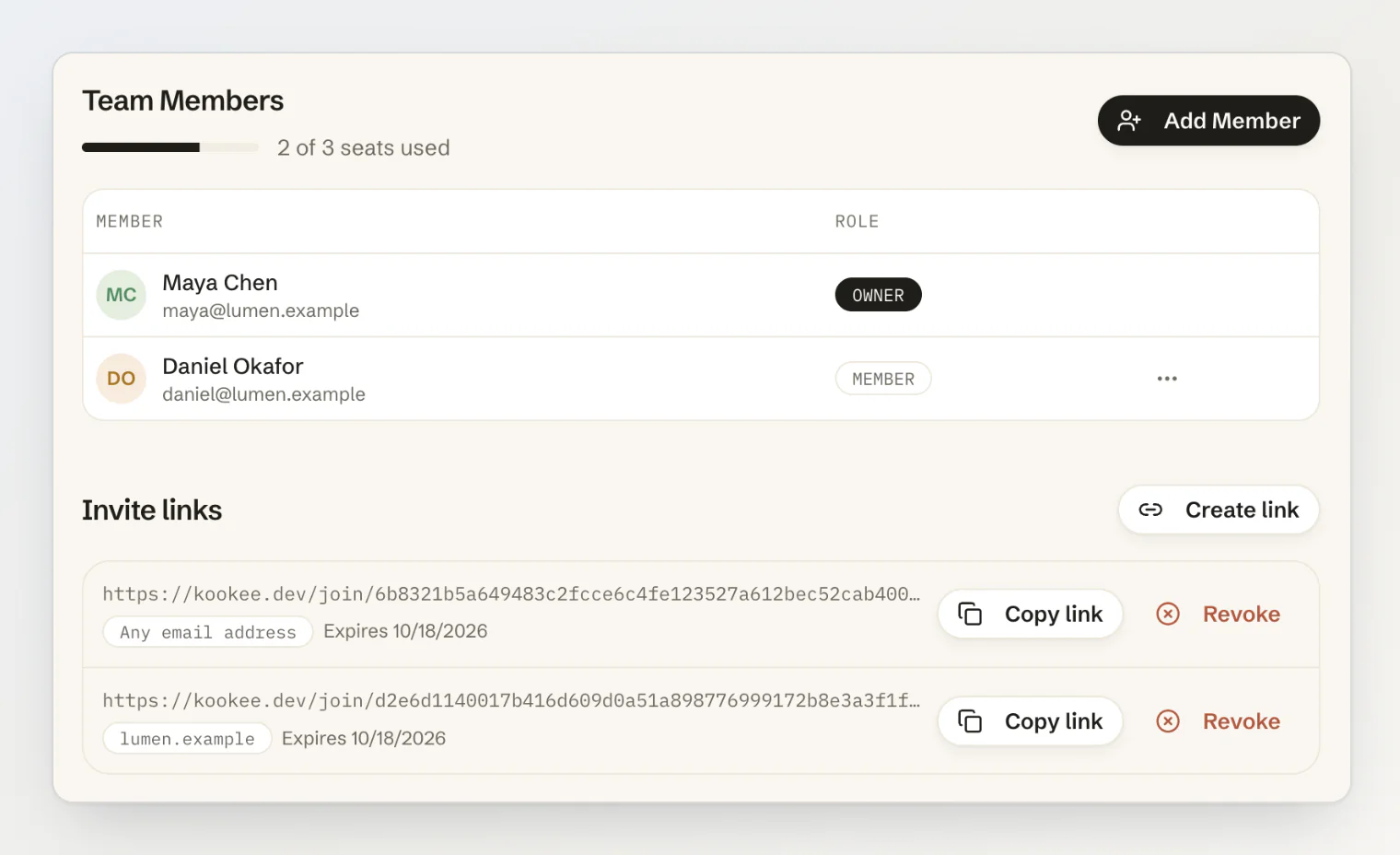
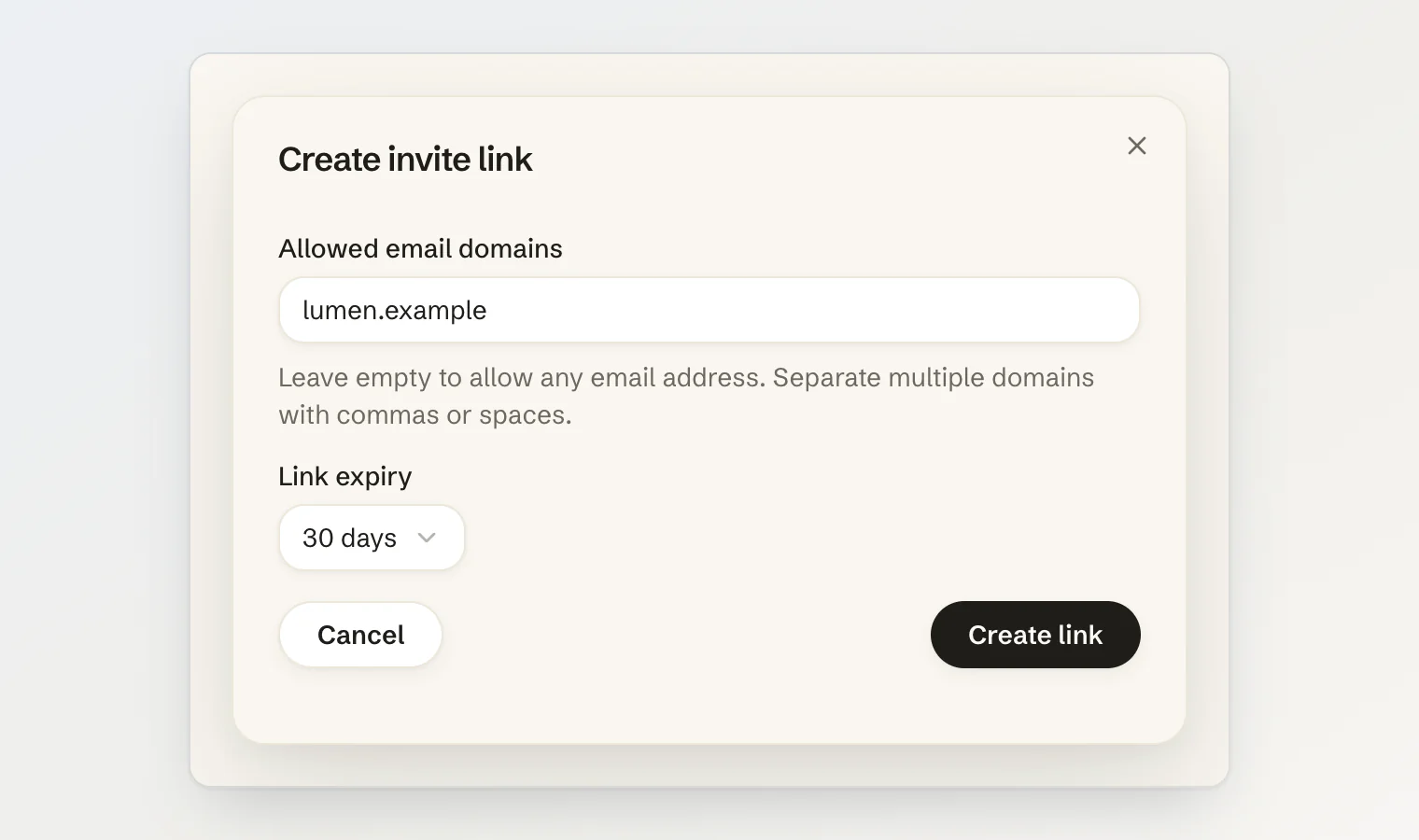
Creating one is two decisions: which email domains may use it, and how long it stays open. Leave the domains empty and any address can join; fill them in and the link only admits verified addresses on those domains. Expiry is 7 days, 30 days or never, and 30 days is what you get if you do not choose.
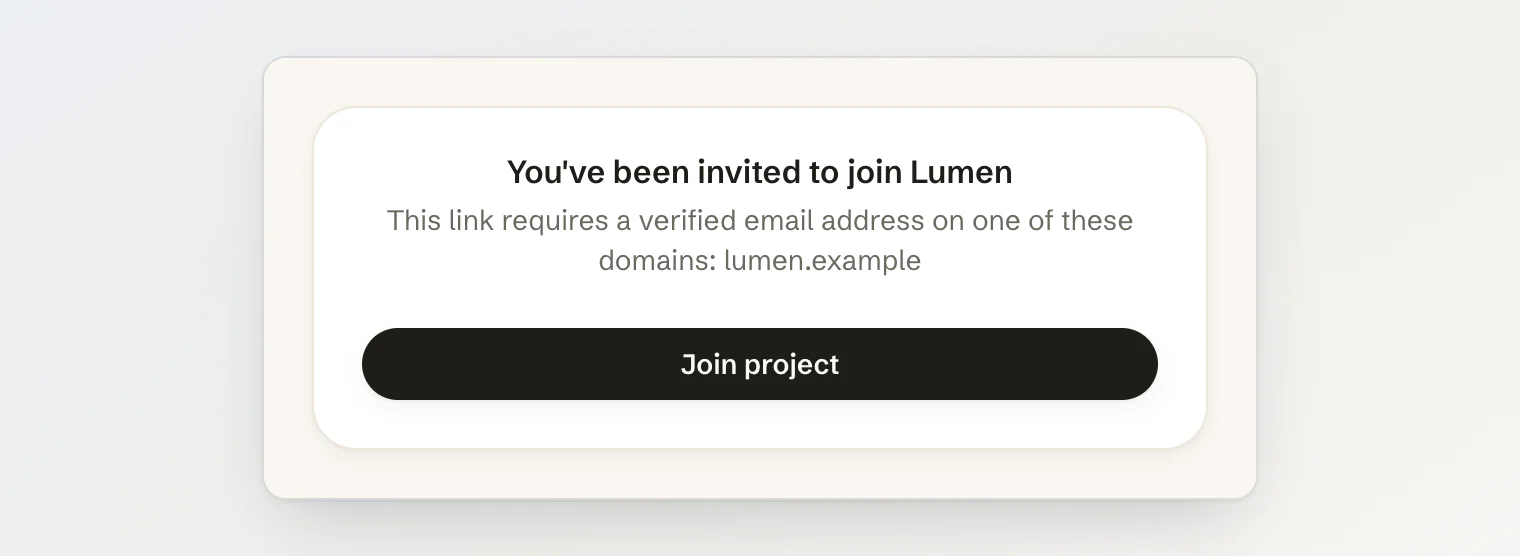
The person who opens the link sees the project they are joining, and the restriction if there is one. They have to be signed in with a real account — a guest session cannot take a seat — and they always arrive as a member, never as an admin.
A limit you discover by hitting it is a bug report
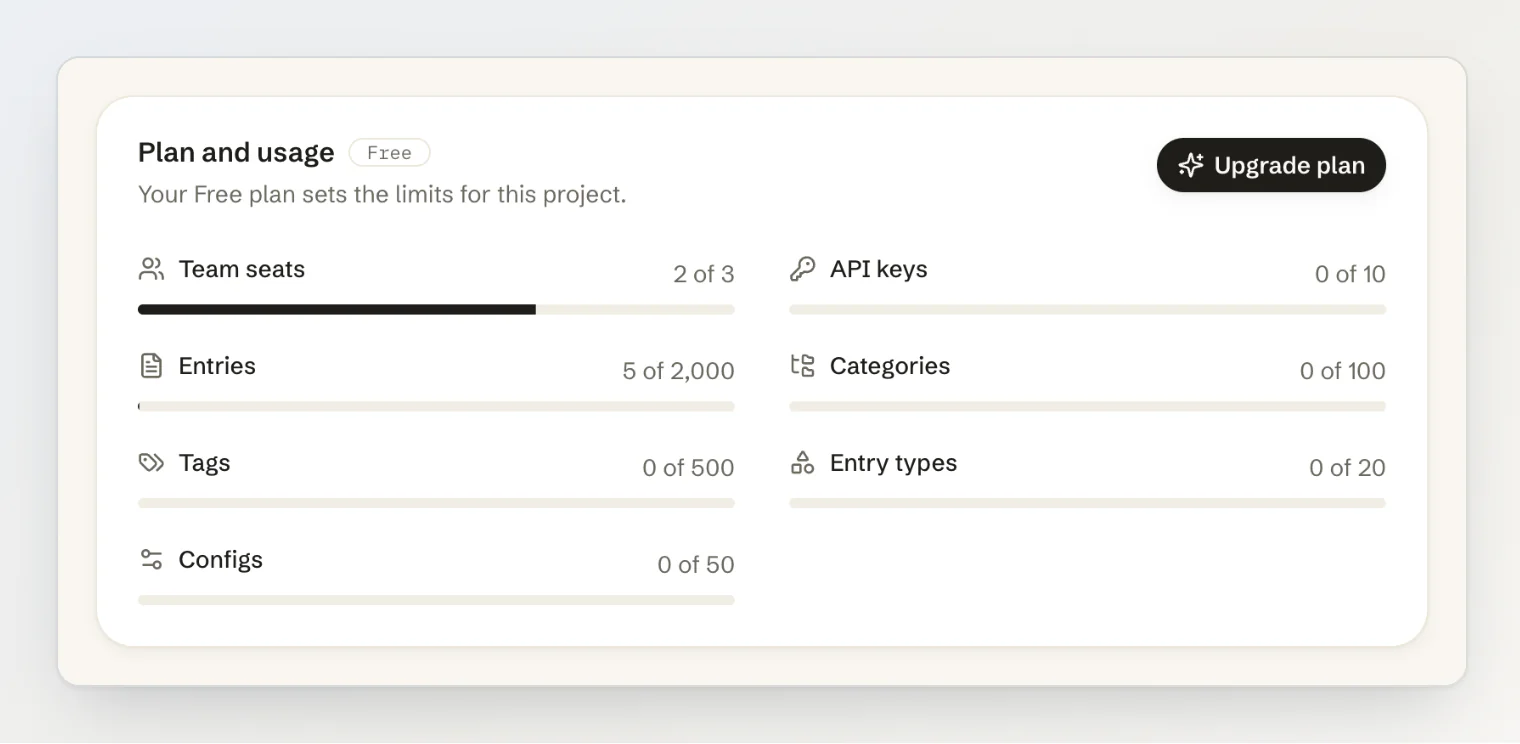
Seats are one of several limits a plan sets on a project, and the same reasoning applies to all of them: a number you can only learn by running into it reaches you as an angry message rather than an upgrade.
So every project now shows what its plan allows next to what it is using — seats, entries, API keys, categories, tags, entry types and configs — and each list warns before it fills rather than after.
If you are building invite links
Treat the link as a bearer credential, because that is what it is. Design it the way you would design a shared password, not the way you would design an email.
Narrow it to verified domains, and refuse unverified addresses outright. An unverified address makes the domain rule decorative.
Keep allow-list entries ASCII, and normalise them the same way you normalise the addresses you compare them against.
Give it an expiry by default, and make "never" the deliberate choice rather than the easy one.
Grant the lowest useful role. A link should never be able to create more links.
Revoke a link when the person who created it loses the authority they created it with.
Count pending invitations against your seat limit, and count each person only once.
List every live link where a human will look, and make revoking one a single click.
Kookee projects now have shareable invite links, and every project shows the limits its plan sets. See Inviting your team to a project to set one up, or Rate limits, plans and error handling for what each plan allows.