Last month we moved Kookee's MCP server to personal tokens. Everyone creates their own, the assistant acts as that person, and every change it makes says who made it. In Claude Code and Cursor that works well: you paste your token into one command or one config file, and you are done.
Then try explaining it to someone who writes release notes in Claude on a laptop, or goes through feedback on the phone. Claude's chat apps and ChatGPT have no field for an Authorization header. They connect to a remote MCP server one way: you give them a URL, they send you off to sign in, and they keep the session. That is OAuth, and until this week Kookee did not speak it.
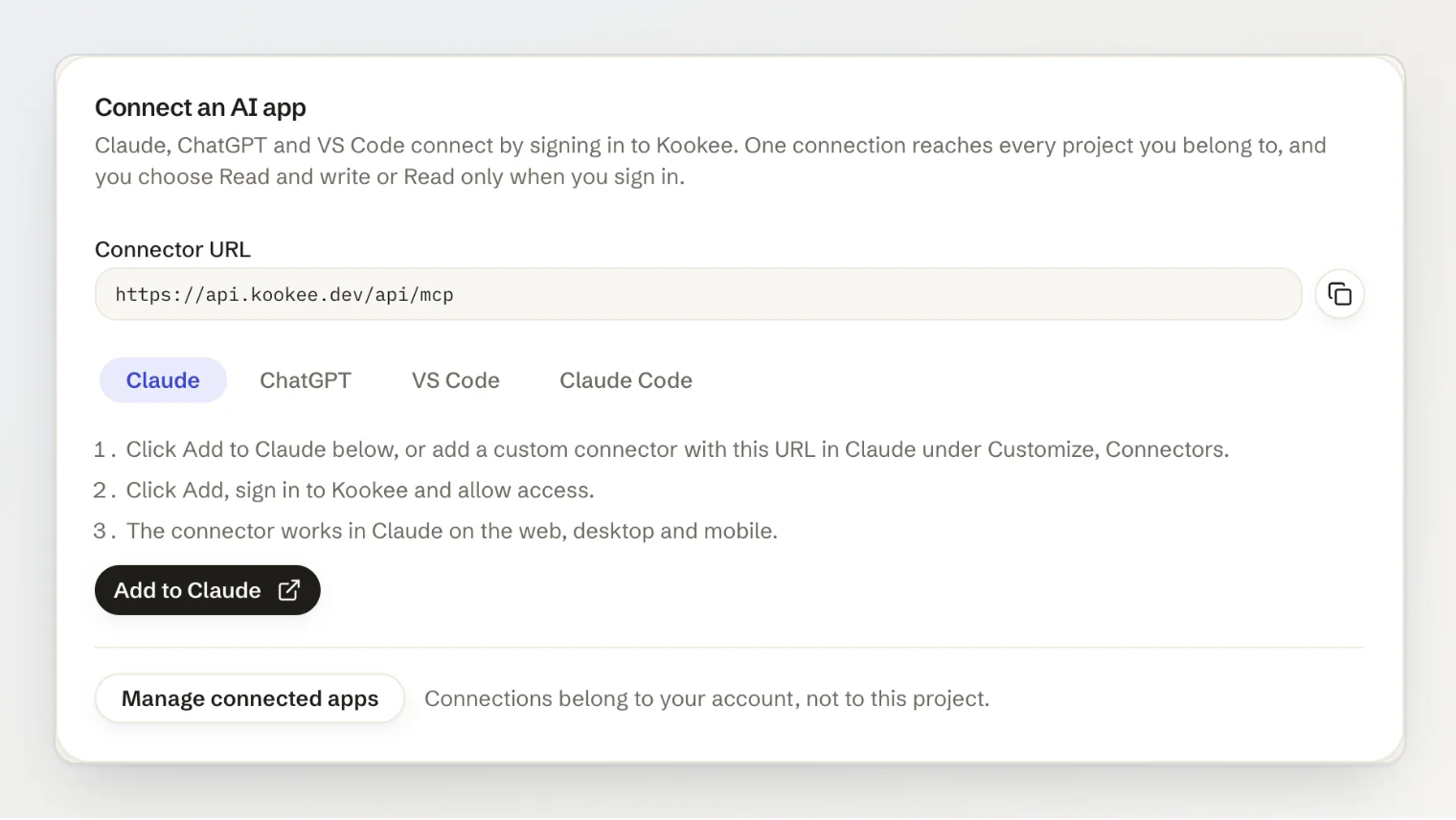
Now it does. You add https://api.kookee.dev/api/mcp in Claude, ChatGPT or VS Code, sign in to Kookee, choose Read and write or Read only, and that is the whole setup. Here is what we shipped, and the decisions that took longer than the code.
What connecting looks like now
Every project's MCP server page has a new card with the URL and the steps for each app. For Claude there is an Add to Claude button. It opens Claude's Add custom connector dialog with the name and URL already filled in, so all you do is click Add.
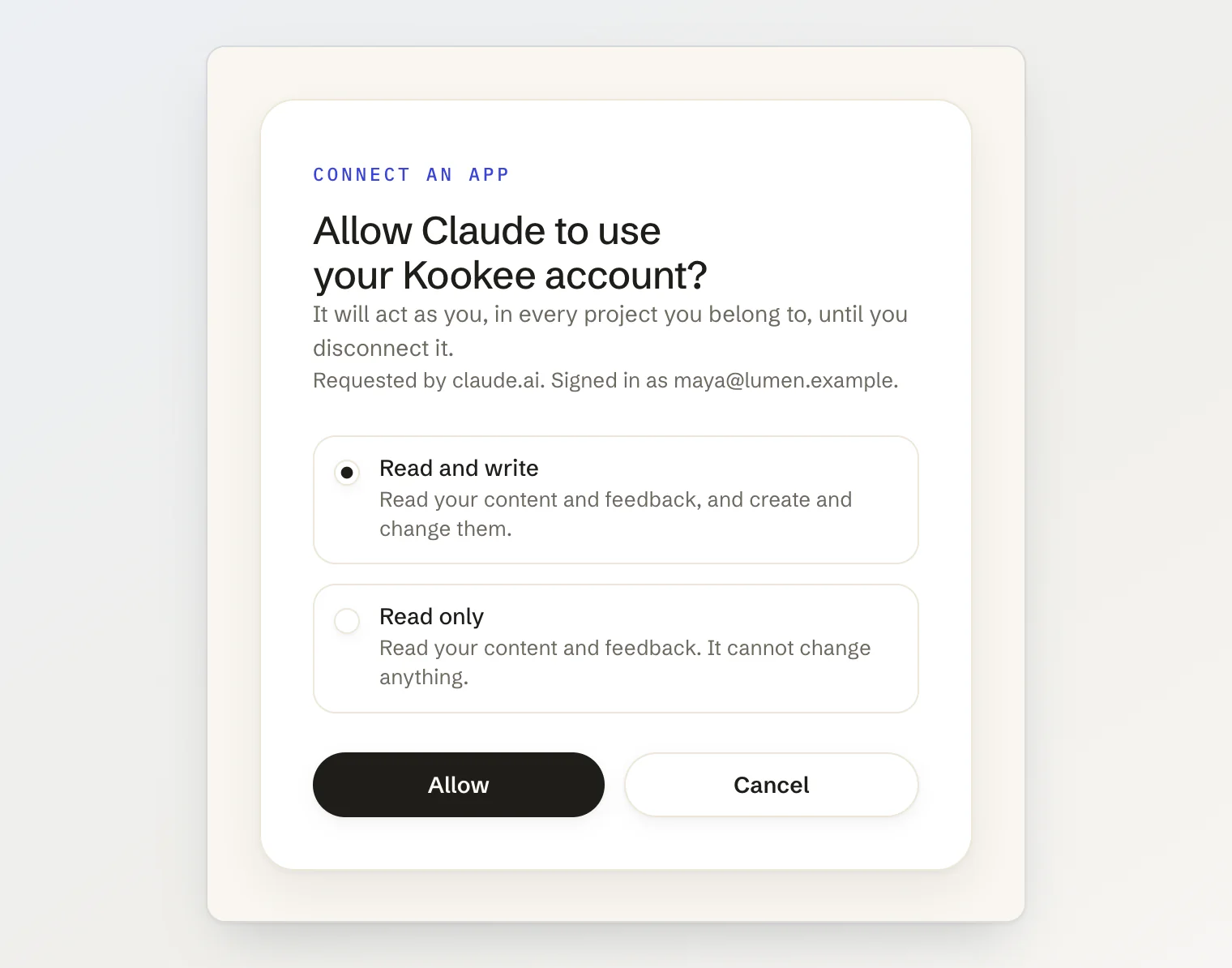
Claude then opens a Kookee page. You sign in, or create an account, and decide what the app may do:
No token to create, copy, store or rotate. The connector then shows up in Claude on the web, on the desktop and on the phone.
Seven decisions behind our MCP OAuth
1. One connection per person, not per project
Our first plan copied the token model: a token belongs to one project, so a connection should too. Claude killed that plan. It will not let you add a second custom connector with the same URL, so a connection tied to one project would have capped every Claude user at one project. A separate URL for each project gets around that, and leaves someone in five projects with five connectors to set up and keep track of.
So a connection belongs to your account and reaches every project you are a member of, with your role in each. Every tool except list_projects takes an optional project argument. If you are in one project, the assistant never needs it. If you are in several, you say "in the Lumen project" and it passes the slug. list_projects covers the case where it has to ask.
When the project is missing or wrong, the server does not answer with an HTTP error. It returns an ordinary tool result that says what went wrong and lists your projects:
{
  "error": "MCP_PROJECT_REQUIRED",
  "message": "This account belongs to several projects. Pass `project` with the slug of the one the user means.",
  "projects": [
    { "slug": "lumen", "name": "Lumen", "role": "OWNER" },
    { "slug": "lumen-docs", "name": "Lumen Docs", "role": "MEMBER" }
  ]
}
A model reads that and tries again with the right slug. A 400 from the transport, on the other hand, reads to it as a broken server.
2. Read only is a choice on the consent screen
With tokens, you pick the access when you create the token. With OAuth there is no token page, so the choice moved to the moment you approve the app.
Underneath, the two options are OAuth scopes, read and write, and choosing Read only drops write before the app gets its code. As with tokens, a read-only connection does not just refuse writes: it never lists the write tools. A model that can see move_feedback plans a whole triage around it and fails at the last step. A model that cannot see it tells you the connection is read only.
3. Disconnect has to mean disconnected
This took the most time. An OAuth app holds two tokens: an access token that lasts an hour, and a refresh token it trades for new access tokens. Out of the box, the refresh grant in the OAuth server we built on did not check whether you still allowed the app. Remove the app's consent, and it could have gone on getting fresh access tokens.
So two things happen now. Every MCP request looks up the access token, the consent behind it and the account, in one query, and refuses the request if any of them is gone or the account is disabled. And disconnecting deletes the consent, the refresh tokens and the access tokens together, in one transaction. Disconnect an app in Kookee, and its very next request is refused.
Changing or resetting your password disconnects every app too. If you are resetting a password because something went wrong, an assistant somewhere with a working session is the last thing you want. Guest accounts cannot connect at all.
4. Tokens you can take back, not tokens you wait out
A common choice for OAuth access tokens is JWTs: signed, self-contained, checked without a database lookup. They also cannot be taken back before they expire. For an assistant that can publish under your name, "it stops working within the hour" is not good enough.
Ours are random strings, stored only as SHA-256 hashes, with prefixes of their own: mcpa_ for access tokens and mcpr_ for refresh tokens. A secret scanner, or a person reading a log, can tell them apart from a personal token (kkm_) or an API key (kk_). The price is one query per request, and we already make it.
5. Only apps we know
MCP clients identify themselves with a client ID metadata document: the client ID is a URL, and the server fetches it to learn the app's name and where it may send you back. It is a tidy design. It also means a server that accepts any URL will fetch whatever it is pointed at, and store a client for it, before anyone has signed in.
We accept a short list instead: Claude, Claude Code, ChatGPT and VS Code, each recognised by the address its metadata document lives at. The consent screen can then say "Allow Claude" and mean it, and nobody can host a document elsewhere that calls itself Claude.
That has a cost. Cursor registers itself with dynamic client registration, which we left off, so Cursor users keep using personal tokens. Those work exactly as before.
6. The consent page cannot be framed
A page with an Allow button is the classic target for clickjacking: load it in an invisible frame and put something tempting under the button. Ours sends Content-Security-Policy: frame-ancestors 'none' and X-Frame-Options: DENY, so no other site can frame it. Two headers, and easy to forget until someone writes in about it.
7. The same attribution as before
Signing in changes how you connect, not what gets recorded. A change made from Claude is saved under your name, like a change made with a token, and the server log notes which app made it. On the feedback board, its column moves, reassignments and replies are marked via MCP, so your teammates see who moved the post, and that an assistant did it.
What you see in Kookee
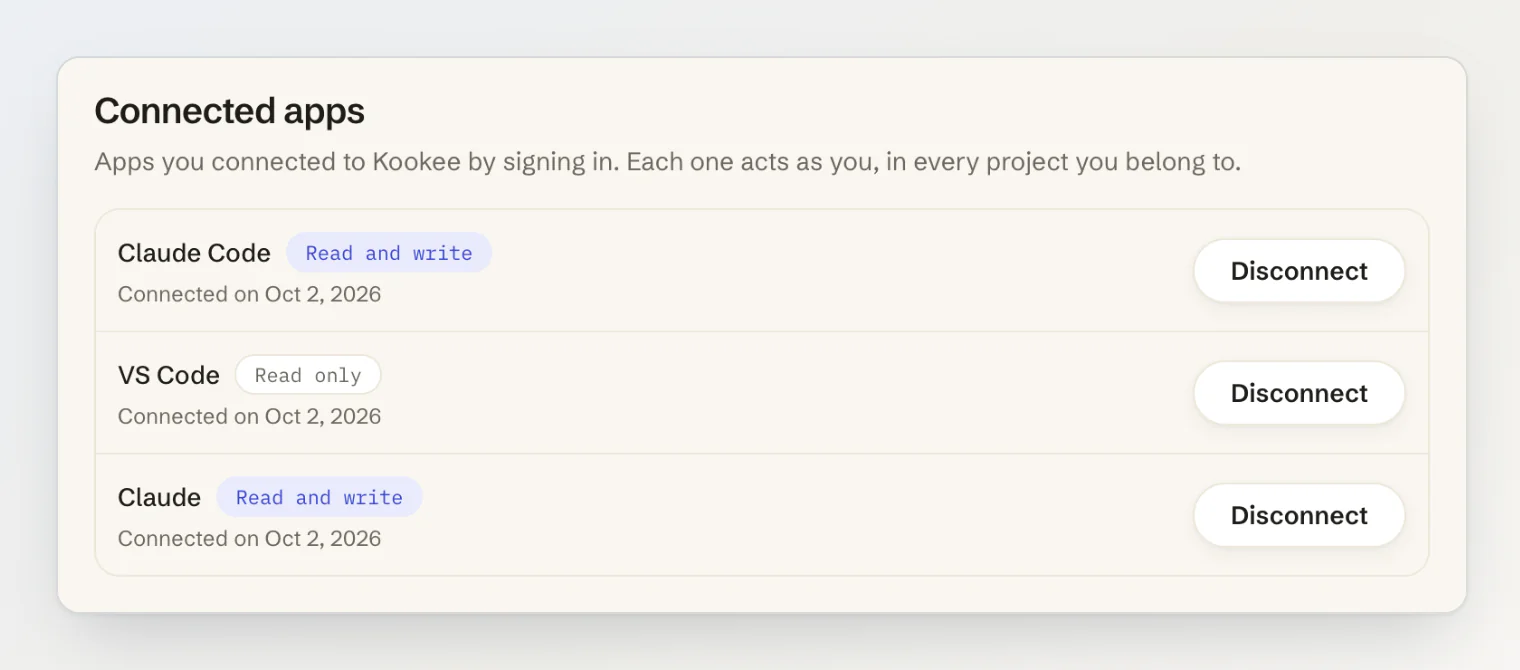
Everything you have connected is listed in your account settings, under Security → Connected apps, with its access and the day you connected it. Disconnecting takes one click and a confirmation.
Personal tokens have not gone anywhere. They are still the right tool for Cursor, for scripts and CI, and for a .mcp.json the whole team commits, and they now sit in one card on the MCP server page, below the new one.
If you run an MCP server
Support OAuth. People in Claude, ChatGPT and other chat apps cannot paste a header.
Make the connection per person, and take the workspace as a tool argument. Claude will not accept the same URL twice.
Put the read-only choice on the consent screen, and do not list tools the grant cannot use.
Check the consent on every request, and delete the refresh tokens when someone disconnects. Do not count on the refresh grant to do it for you.
Prefer opaque tokens you can revoke over JWTs you have to wait out.
Accept a list of known client metadata URLs instead of fetching whatever a client sends.
Keep the consent page out of frames.
Answer "which project?" with a tool result the model can act on, not with an HTTP error.
Kookee's MCP server now works with Claude, ChatGPT and VS Code by signing in. See Connecting Claude, ChatGPT or VS Code to Kookee for the steps, or Managing your content from an AI assistant (MCP) for what an assistant can do once it is connected.