This guide goes through the decisions behind a status page for a SaaS: what to list on it, when an uptime monitor should call something an outage, how to word incident updates, and where the page should live. The worked example is the status page and uptime monitors we have just added to Kookee, and the screenshots come from Lumen, the made-up analytics product in our demo project. One of those monitors got tested sooner than planned: while taking the screenshots, we switched off the demo project's portal by mistake, and its two monitors caught it 68 and 78 seconds later.
What goes on a status page
A useful status page has four parts:
the parts of your product, each with its status right now;
the incidents that are open, with what you know so far;
the maintenance you have planned, before it starts;
the recent past: the incidents of the last few months, and how much of that time each part was up.
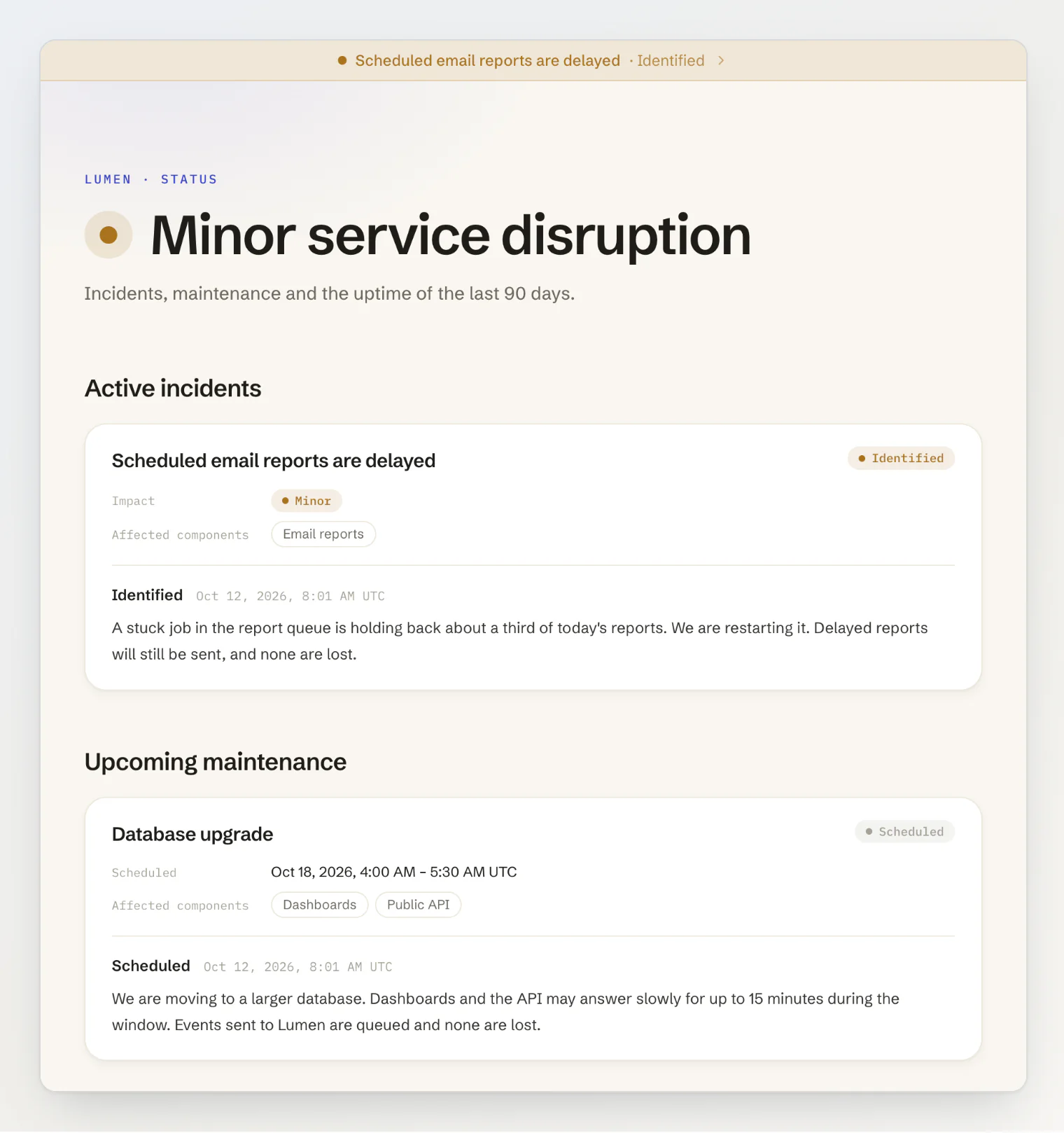
Above them, one line sums up the whole page, so a visitor who only wants to know whether the problem is on their side can stop reading after it. Kookee's page says All systems operational, Minor service disruption, Major outage or Maintenance in progress, worked out from the components and the open incidents.
Name components the way customers do
A component is something a customer can check against what they see. Lumen lists Dashboards, Data ingestion, Public API, Email reports and Help center. It does not list its queue workers or its database, because nobody outside the team knows what those do. In the screenshot above, Lumen's made-up incident names Email reports as the affected component, and further down the page that component reads Degraded performance. A customer missing a scheduled report can match that to what they see.
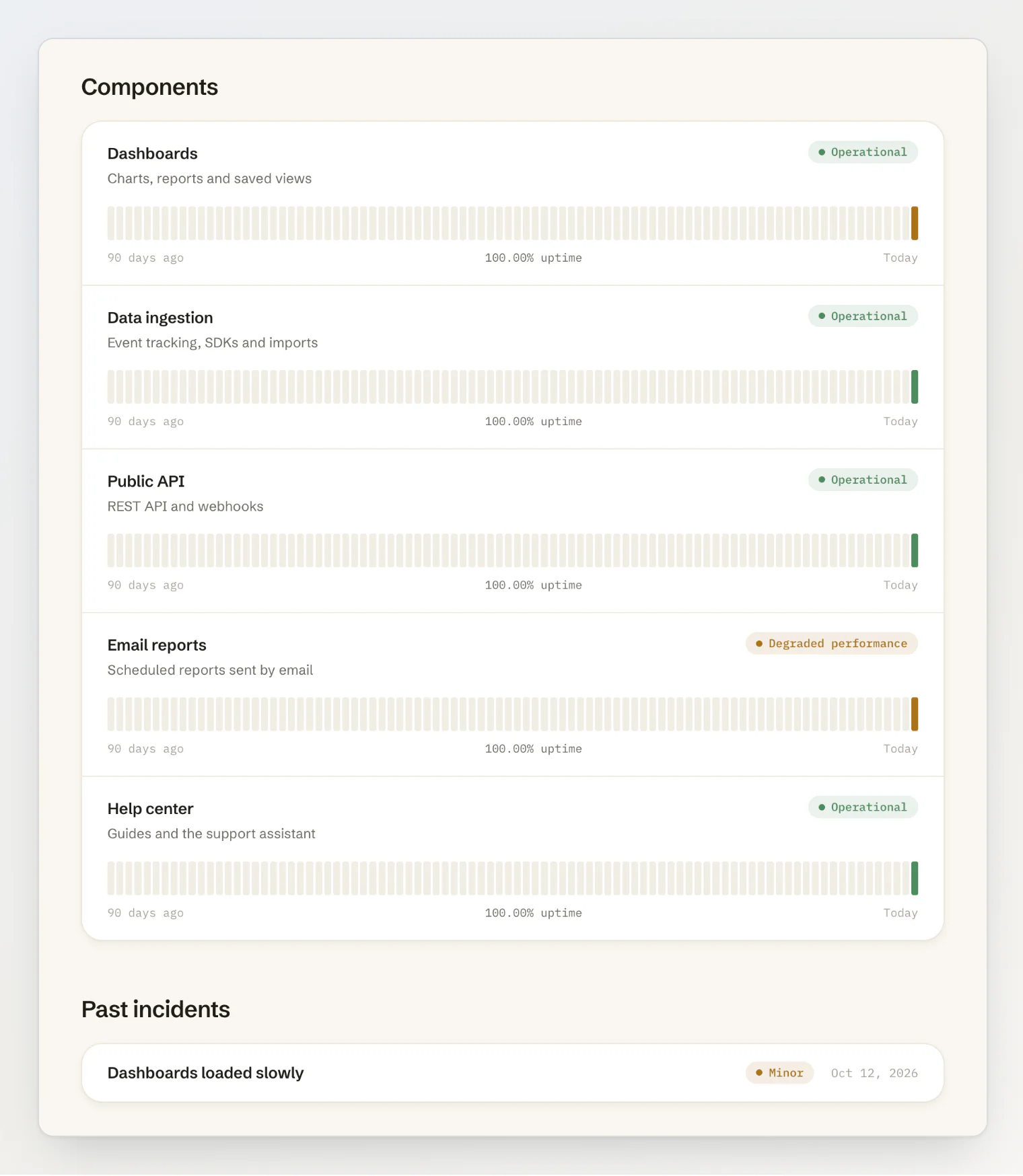
Kookee allows 10 components on Free and 50 on Pro. Each one gets a bar per day, coloured by the worst status it had that day: 90 days on a wide screen, the last 30 on a phone, and none if you switch Show uptime off.
Decide when a site is really down
An uptime monitor requests a URL on a schedule and has to decide when a failure is an outage. Kookee's rule is three failed checks in a row. After a failed check, the monitor checks again 20 seconds later, so the three failures take about 40 seconds on any interval, longer if each check waits out its timeout. The interval only decides how soon the first failure comes: on Pro and Ultra a monitor can check every minute, on Free every five minutes at most. A single failed check sets nothing off, and two successful checks in a row bring the monitor back up.
Here is what that looked like when we switched off the demo portal. The portal went off at 08:02:36 UTC. The monitors called it down at 08:03:44 and 08:03:54, each after three 404s, and the one on the help center opened a draft incident, "Help center is down". The portal was back on at 08:04:18, the monitors were up again at 08:05:24 and 08:05:34, and the draft was resolved on its own without ever reaching the public page. The outage each monitor recorded lasted about as long as the real one and ran about a minute behind it at both ends: the cost of confirming before you call it.
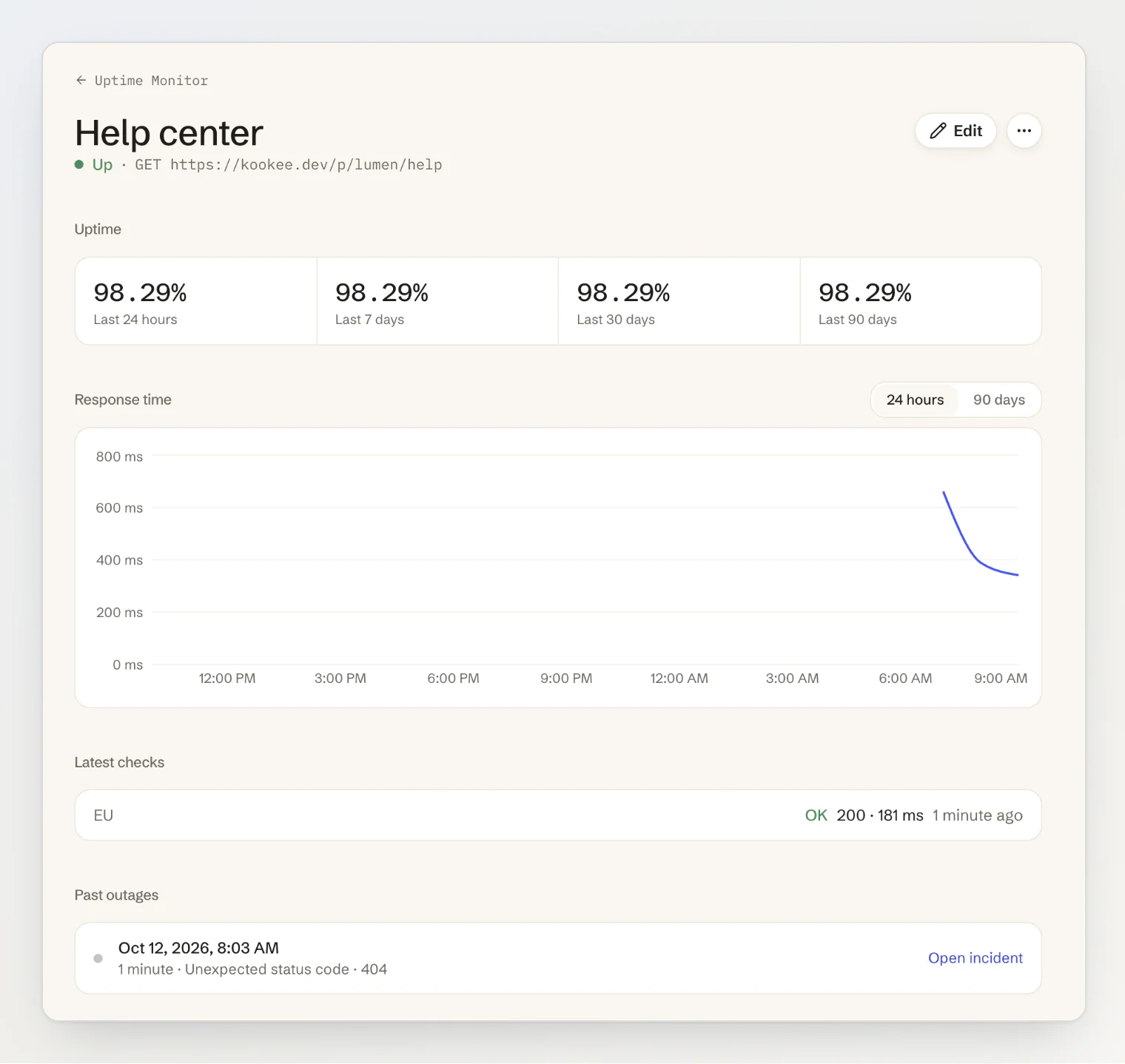
A few more rules decide whether you can trust the monitor. A monitor that has never succeeded only alerts your team, because a typo in the URL should not show your customers an outage that never happened. Once it has been up, a down monitor marks its component as Major outage whatever else it is set to do, so the page cannot say Operational while the check fails. And if the component is under planned maintenance, the monitor holds the outage until the window ends.
What happens next is your choice for each monitor: Alert only, Open a draft incident, or Publish an incident at once. A draft gives you a ready incident to check and reword before it goes out. Publishing at once suits a URL whose failure always means customers are affected, such as your API's health check.
Write updates people can act on
An incident is a title and a series of updates. Each update has a status, which Kookee keeps to four for incidents: Investigating, Identified, Monitoring and Resolved. The title should name what customers notice ("Dashboards loaded slowly"), not the cause.
Each update should answer what a customer would ask next. In Lumen's resolved incident below, the first update says what is affected, with a number: "Some dashboards take more than 20 seconds to load." Identified gives the cause once it is known: "This morning's release changed how large funnel charts are queried." Monitoring says what the team is watching before calling it fixed: "We are watching load times for the next hour." The email reports incident above adds the other thing customers ask about, whether anything is lost: "Delayed reports will still be sent, and none are lost."
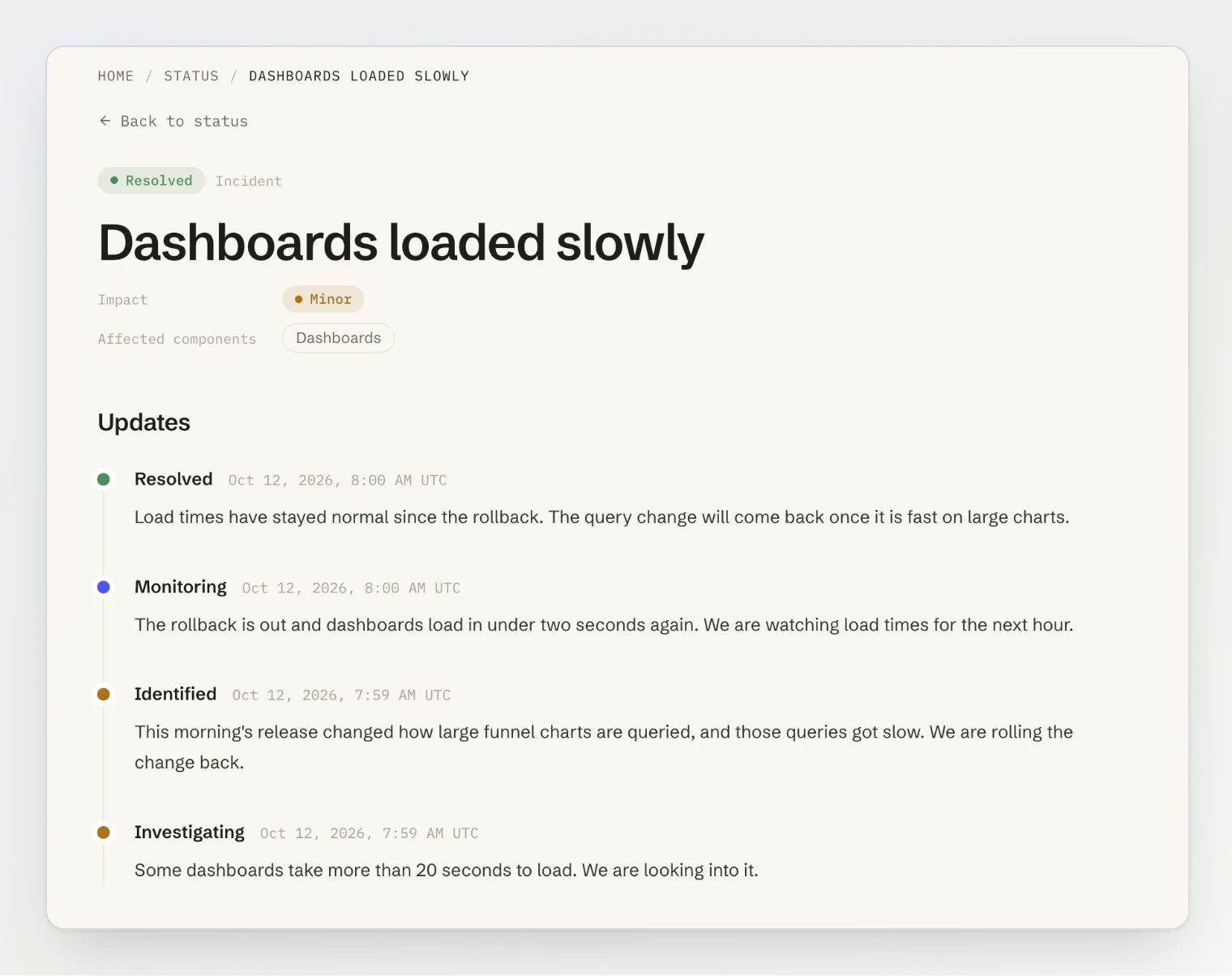
In Kookee, each update also sets the status of each component it touches, so one update changes both the incident and the component list.
Announce maintenance before it starts
In Kookee a maintenance window is public as soon as you schedule it, under Upcoming maintenance. It is in progress between its start and its end, and its components read Under maintenance. Then it is completed, with nobody having to start or stop it by hand. Say what customers may notice and for how long, as Lumen's database upgrade does: "Dashboards and the API may answer slowly for up to 15 minutes during the window."
How Kookee counts uptime
Kookee counts only time in Major outage as downtime. Degraded performance and partial outages colour the day's bar but do not lower the number. The percentage covers 90 days and starts when the component was added, so earlier days are grey, not green. It is rounded down: 99.996% shows as 99.99%, never as 100.00%.
Host it away from what it reports on
A status page served by the system it describes goes down with it. Kookee's hosted page lives at <your-project>.kookee.dev/status, apart from your own servers. If you want it on your own domain, the same page is built from @kookee/react/status: StatusHeadline and StatusOverview for the page, StatusIncidentArticle for each incident. Serve it from somewhere other than the app it reports on, such as a static host, and let the browser read the status from Kookee's API:
import { useStatus } from '@kookee/react';
import { StatusHeadline, StatusOverview } from '@kookee/react/status';

const { data: status } = useStatus({ refreshSeconds: 60 });
if (!status) return null;

<StatusHeadline status={status} />
<StatusOverview status={status} incidentHref="/status/incidents/{id}" />
Status reads do not count against your monthly API requests. In any of our four starters, KOOKEE_STATUS=true adds /status and a page per incident. The same limit applies to us: the page and the components read from Kookee's API, so if that API is down, they cannot load either.
Set it up in Kookee
Open Status Page, go to the Components tab and click Add component for each part customers can see.
Open Uptime Monitor, click Add monitor, enter the URL, pick the Check interval and the Component, and choose what happens When it goes down.
Open Public Portal, turn on Enable Public Portal if it is off, and tick Status page under Portal Modules.
Back on Status Page, click View status page.
Set up a status page covers incidents and maintenance, and Monitor your site with uptime checks every monitor setting.
What Kookee's status page does not do yet
Visitors cannot subscribe to updates by email or RSS. There are no SMS alerts or on-call schedules, monitors only make HTTP and HTTPS checks, and there are no private status pages. The hosted page cannot have a domain of its own; the React components are the way to put it on yours.
FAQ
Is the status page free? Yes. Every plan has the status page and uptime monitors. Free has 10 components and 3 monitors, checked every 5 minutes at most; Pro has 50 components and 20 monitors, checked as often as every minute.
Who is told when a monitor goes down? The project's owners and admins, in the dashboard and by email. Webhooks can get a monitor.down event, and on Pro and Ultra, Slack, Discord and Telegram integrations can post it to your team's channel.
Can an AI assistant post incidents? Yes. Over Kookee's MCP server, an assistant with write access can read the status and create, update and resolve incidents.
Continue reading
Set up a status page: every step in the dashboard, from components to maintenance.
Show your status page on your own site: the React components, the API and the starters.
Your Webhooks Shouldn't Trust the URL They Were Given: why a server that calls customers' URLs has to check where they point.