A webhook is a URL of yours that Kookee calls when something happens in your project: a post is published, an article changes, a visitor leaves feedback. Use one to rebuild a static site when content changes, to refresh a cache, or to send events into your own systems.
Webhooks come with every plan. To post into Slack, Discord or Telegram, or to open issues in GitHub, Jira, Asana or Freshdesk, use Integrations instead: they format the message for each service.
Add an endpoint
Open Webhooks under Connect in your project.
Click Add endpoint and paste the URL.
Pick the events it should receive, and click Add endpoint.
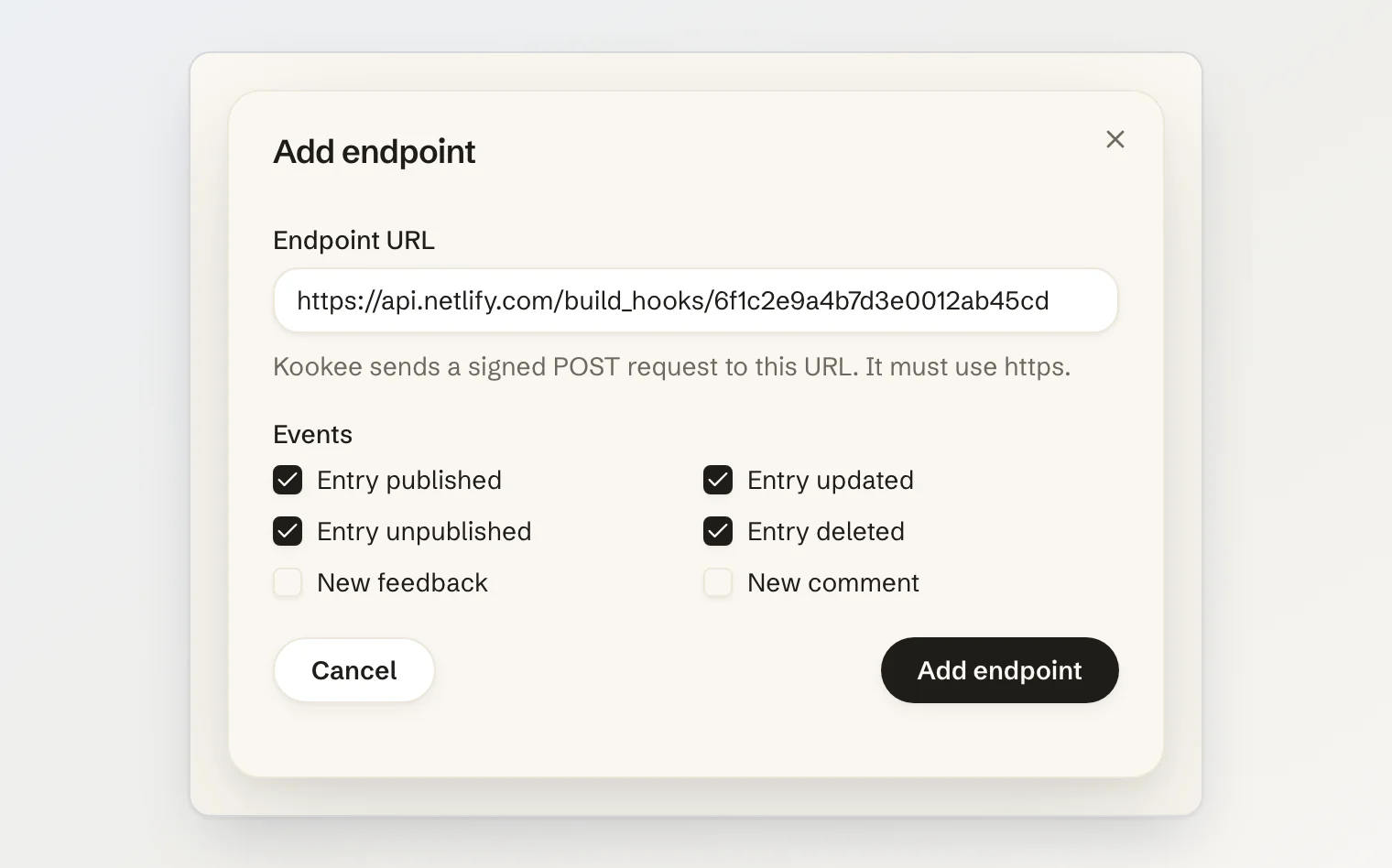
Owners and admins manage webhooks. Members see a note instead of the endpoints, and guest accounts cannot add any.
Saving only checks the URL's shape. The address has to:
use
httpson the standard port;name a host, not an IP address, with no user name or password in it;
not be
localhostor end in.local,.internalor.home.arpa.
Each send then looks the host up again, and refuses it when any of its addresses is private, loopback, link-local or a cloud metadata address. A refused send is not retried.
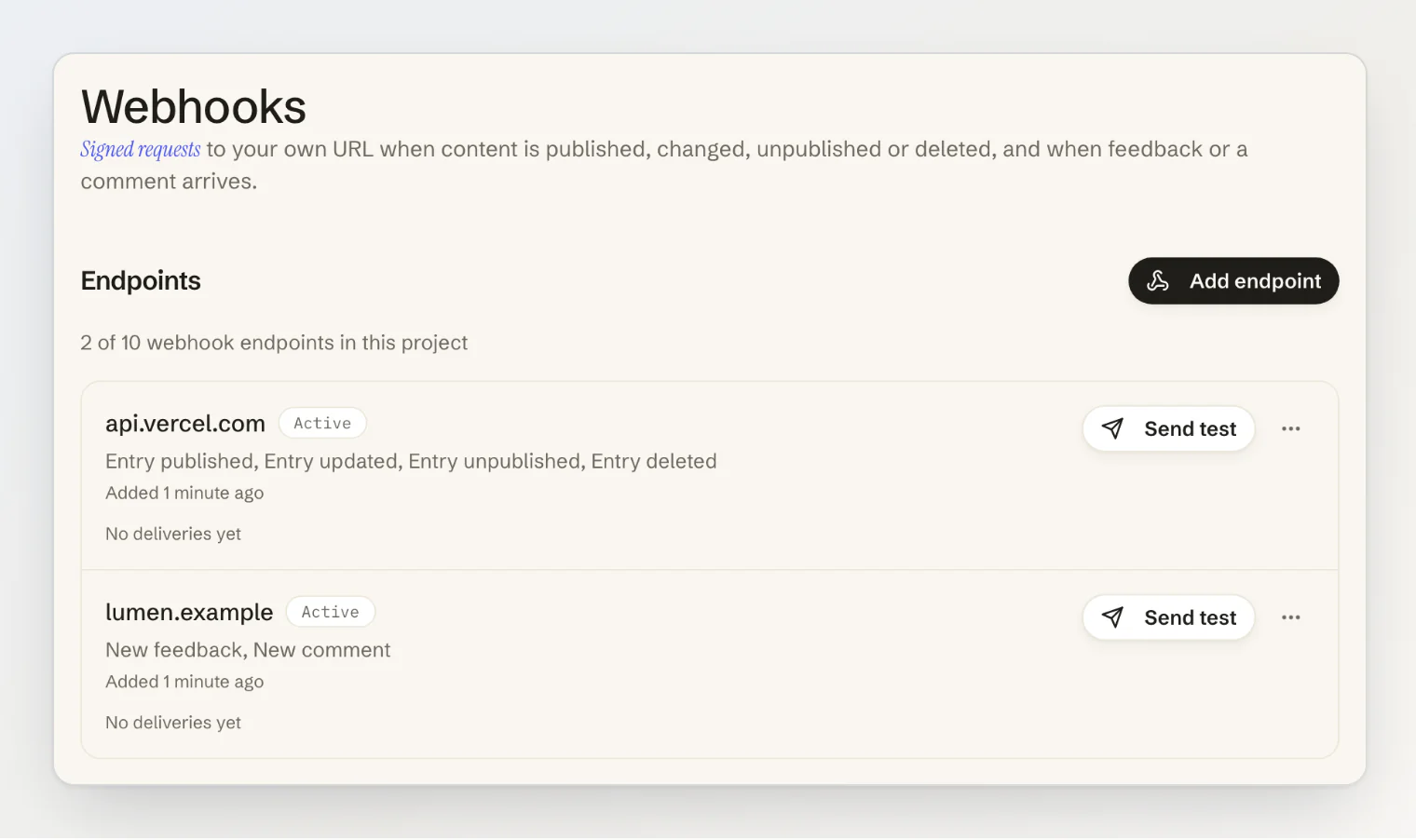
Each endpoint shows its events, whether it is on, and its last attempt: when it was, and the status your server answered or what went wrong.
Events
Event | Sent when |
|---|---|
| A blog post, page, help article, changelog entry or announcement becomes visible on your site: it is published, switched from chatbot only to public, or its scheduled date arrives. |
| A visible entry is saved and stays visible. |
| A visible entry stops being visible: it is unpublished, switched to chatbot only, moved to a future date, or its unpublish date passes. |
| A visible entry is deleted. |
| A feedback post is created, including a post held for review. |
| A comment is added to an entry or a feedback post. |
| An incident on your status page is published, or a maintenance is scheduled. The incident can come from your team, an AI assistant or an uptime monitor. |
| An update is posted on a published incident or maintenance, including the ones a monitor posts when it goes down again or comes back up. |
| An uptime monitor is down: three checks in a row failed. |
| A monitor that was down is up again. |
Scheduled dates are kept: a post set to go live at 9:00 sends entry.published at 9:00, and an announcement with an unpublish date sends entry.unpublished when it ends. Entries that were never visible send nothing, so a draft saved ten times is quiet. Feedback posts send feedback.created, never entry.*.
The dashboard lists the status events as Incident published or maintenance scheduled, Incident updated, Monitor down and Monitor up again. A draft incident sends nothing until it is published. Nothing is sent when an incident or a maintenance is edited or deleted, when a component's status is set by hand, or when a maintenance window starts or ends on schedule. A monitor that has never been up sends no monitor.down: it only alerts your owners and admins. During a maintenance of its component, a monitor holds its monitor.down until the window ends.
Send test sends a webhook.test event at once and shows what your server answered. It works while an endpoint is turned off, and it never counts toward turning one off.
What your server receives
Every event is a POST with a JSON body:
{
  "type": "entry.published",
  "timestamp": "2026-10-09T09:00:00.000Z",
  "data": {
    "project": { "id": "4b1f…", "slug": "lumen", "name": "Lumen" },
    "id": "9a3c…",
    "type": "blog",
    "locale": "en",
    "slug": "dashboards-that-explain-themselves",
    "title": "Dashboards that explain themselves",
    "translationGroupId": "77e0…",
    "publishedAt": "2026-10-09T09:00:00.000Z"
  }
}
feedback.created carries the post's id, title, its text as contentText (up to 1,000 characters), status (draft while it waits for review), category and author (id, name, isTeamMember). comment.created carries the comment's contentText, isOfficial, author (id, isTeamMember) and target, the entry it was left on. No email address is ever sent.
incident.created and incident.updated carry the incident's id, kind (incident or maintenance), title, status, impact, its components with the status each shows now, scheduledStartAt and scheduledEndAt for a maintenance, resolvedAt, the update that caused the event (id, status and body, in Markdown), and pageUrl, the incident's page on your status page, or null while that page is not public. monitor.down and monitor.up carry the monitor's id, name, url and component, and its outage: id, startedAt, endedAt and durationSeconds once it is over, cause and statusCode.
The request carries these headers:
Header | Value |
|---|---|
|
|
| When this attempt was signed, in Unix seconds |
|
|
|
|
Verify the signature
Kookee signs every request the Standard Webhooks way, so any of its libraries checks it. Find the endpoint's signing secret in its menu: Reveal signing secret shows it, and Regenerate signing secret replaces it, after which the old one stops working at once.
import { Webhook } from 'standardwebhooks';

const webhook = new Webhook(process.env.KOOKEE_WEBHOOK_SECRET!); // whsec_…

export async function POST(request: Request) {
  const body = await request.text();
  let event;
  try {
    event = webhook.verify(body, Object.fromEntries(request.headers));
  } catch {
    return new Response('Invalid signature', { status: 400 });
  }

  if (event.type === 'entry.published') {
    // rebuild, revalidate, notify…
  }
  return new Response(null, { status: 204 });
}
Verify the raw body, before parsing it: re-serialised JSON no longer matches the signature. The library also refuses requests whose timestamp is more than five minutes off, so a captured request cannot be replayed later.
Rebuild a static site on publish
A deploy hook from Vercel, Netlify or Cloudflare Pages is a URL that starts a build when it receives a POST. Add it as an endpoint with the four entry.* events, and your site rebuilds whenever content goes live, changes, comes down or is deleted, including at a scheduled date. Build hooks do not check signatures, so keep the hook's URL to yourself.
Retries, and when an endpoint turns off
Answer with any 2xx status within 10 seconds. Kookee does not follow redirects, and reads only the start of your answer.
A failed delivery is retried up to 10 times over about 8 and a half hours, waiting 1, 2, 4 and up to 256 minutes between tries. A retry keeps its
webhook-id, so de-duplicate on it, and order events bytimestamprather than by arrival.410 Goneturns the endpoint off at once. Answer it when the URL is retired for good.Five events in a row that fail every retry turn it off too.
When an endpoint turns off, the project owner gets a notification and an email. Fix your server, then click Turn back on on the endpoint.
Limits
Free | Pro | Ultra | |
|---|---|---|---|
Endpoints per project | 2 | 10 | 50 |
Events an hour, across the account | 100 | 1,000 | 1,000 |
Events an hour, per endpoint | 300 | 300 | 300 |
The hourly limits count content events (entry.*) and visitor events (feedback.created, comment.created) apart, so a burst of feedback cannot use up what publishing needs. Status events (incident.*, monitor.*) are counted apart as well, so a busy hour of publishing cannot hold back an outage alert. Events over them are dropped, and the endpoint shows Events dropped: over the hourly limit.
A slow server is limited by time as well: each endpoint can spend 2 and a half minutes an hour waiting for answers, and an account 7 and a half minutes across its endpoints. Past that, events are skipped until the hour turns and the endpoint shows Skipped: the receiver is too slow this hour. A skip never counts toward turning an endpoint off. Answer quickly and do the slow work after responding.
Adding an endpoint past the plan's limit is refused with WEBHOOK_LIMIT_REACHED. Rate limits, plans and error handling lists every limit.
Continue reading
Connect Slack, Discord, Telegram, GitHub, Jira, Asana or Freshdesk: post feedback into your team's tools without writing a receiver.
Caching strategies for Kookee content: how long to cache your content, and when to clear it.
Next.js integration guide: fetch your content on the server and revalidate it.