The SDK is a convenience wrapper. Everything it does is available over plain HTTP, which is what you want from Python, Go, PHP, Ruby, or any environment where the SDK does not fit.
Base URL: https://api.kookee.dev · All endpoints are prefixed with /v1.
Authentication
One header on every request:
curl -H "Kookee-API-Key: YOUR_API_KEY" \
  https://api.kookee.dev/v1/blog/posts
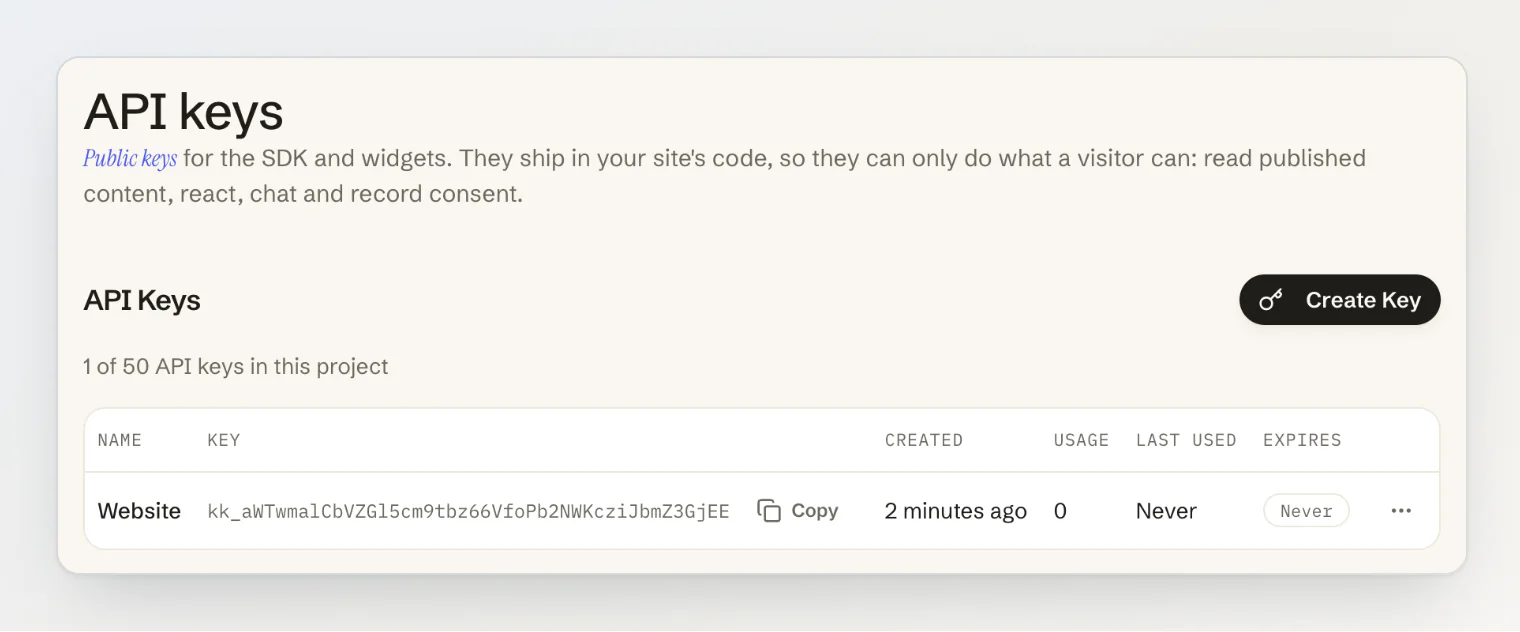
Create the key on Connect → API keys in your project sidebar.
Health
GET /v1/health— health check, useful for verifying a key
Project
GET /v1/project— the project:{ name, defaultLocale, portalUrl, widgetConfigured }
defaultLocale is the language content requests answer in when they send no locale. portalUrl is null while the hosted portal is off. widgetConfigured is true while the project has saved widget settings, and false again after Reset to the plain chat. The request counts against the monthly API quota like a content read. In the SDK it is kookee.project.get().
Entries — the generic endpoint
Every content module is stored as an entry, and one endpoint reaches all of them. This is the only list endpoint that supports field filters and category filtering across all types, so reach for it when the per-module endpoints below come up short.
GET /v1/entries?type=blog— list entries of one typeGET /v1/entries/:slug?type=blog— get by slugGET /v1/entries/by-id/:id— get by IDGET /v1/entries/:slug/translations·GET /v1/entries/by-id/:id/translationsGET /v1/entries/:id/comments— comment threadPOST /v1/entries/:id/reactions— add or remove a reactionGET /v1/tags?type=blog·GET /v1/categories?type=help_article
List parameters: type (required), page, limit, tags (repeatable), category, search, locale, fallback, and filter[...].
Parameters on the two single-entry endpoints — /v1/entries/:slug and /v1/entries/by-id/:id: locale, fallback, markdown=true (also return the body as Markdown in contentMarkdown) and includeChatbotOnly=true (also return an article whose visibility is chatbot-only).
Filtering on structured fields
Fields like a changelog entry's release type are filtered with bracket syntax, one field per parameter:
curl -H "Kookee-API-Key: YOUR_API_KEY" \
  "https://api.kookee.dev/v1/entries?type=changelog&filter[changelogType]=fix"
The value is the option key (fix) or its id. Select and text fields can be filtered; other field types cannot. GET /v1/changelog accepts filter[...] too — the other module endpoints do not, so use /v1/entries for them.
Blog
GET /v1/blog/posts— list postsGET /v1/blog/posts/:slug— get post by slugGET /v1/blog/posts/by-id/:id— get post by IDGET /v1/blog/posts/:slug/translations— translations by slugGET /v1/blog/posts/by-id/:id/translations— translations by IDGET /v1/blog/tags— list tags with post countsPOST /v1/blog/posts/:id/reactions— add or remove a reaction
List parameters: page, limit, tags (repeatable), search, locale, fallback.
Help Center
GET /v1/help/categories— list categoriesGET /v1/help/articles— list articlesGET /v1/help/search— semantic searchGET /v1/help/articles/:slug— get article by slugGET /v1/help/articles/by-id/:id— get article by IDGET /v1/help/articles/:slug/translations·GET /v1/help/articles/by-id/:id/translationsPOST /v1/help/chat— ask the AI assistant a questionPOST /v1/help/chat/stream— the same, streamed
List parameters: page, limit, category, search, locale, fallback. Search parameters: query, limit, locale, fallback, includeChatbotOnly.
Each search hit carries score: the similarity of the passage in matchedChunk, between 0.4 and 1, or null when the search fell back to plain text matching. To read one article as Markdown, or to read a chatbot-only article, use the generic entry endpoints — /v1/entries/by-id/:id?markdown=true&includeChatbotOnly=true. That is where the SDK sends them. See Read your help center from your own AI assistant.
Changelog
GET /v1/changelog— list entriesGET /v1/changelog/:slug— get entry by slugGET /v1/changelog/by-id/:id— get entry by IDGET /v1/changelog/:slug/translations·GET /v1/changelog/by-id/:id/translationsPOST /v1/changelog/:id/reactions— add or remove a reaction
List parameters: page, limit, search, locale, fallback, filter[...].
The release type is a field, not a top-level property. Filter with filter[changelogType]=feature, and read it back from the entry's fields array — type on the response is always the string changelog. Valid keys: feature, fix, improvement, breaking, security, deprecated, other.
Pages
GET /v1/pages— list pagesGET /v1/pages/:slug— get page by slugGET /v1/pages/by-id/:id— get page by IDGET /v1/pages/:slug/translations·GET /v1/pages/by-id/:id/translations
List parameters: page, limit, search, locale, fallback.
Announcements
GET /v1/announcements— list active announcementsGET /v1/announcements/:id— get announcement by IDGET /v1/announcements/:id/translations— translations by ID
List parameters: page, limit, search, locale, fallback.
Expired announcements are excluded automatically. To filter by severity, use the generic endpoint — /v1/entries?type=announcement&filter[announcementType]=critical. Valid keys: info, warning, critical, promotion, maintenance, newFeature.
Feedback
GET /v1/feedback— list postsGET /v1/feedback/by-id/:id— get one postGET /v1/feedback/:id/comments— comment thread (page,limit)GET /v1/feedback/columns— the board columnsGET /v1/feedback/top-contributors— authors whose posts got the most votes (limit)
List parameters: page, limit, columnId, columnType (open, closed), category (feature, improvement, bug, other), search, sort (newest, top, trending).
POST /v1/widget/feedback sends a private message from the site widget's Feedback tab, the request behind kookee.widget.sendFeedback(). The JSON body takes category (feature, improvement, bug or other) and message (up to 5,000 characters), and optionally email, name, visitorId and pageUrl; the answer is { id, createdAt }. The message is not a post: it waits on the dashboard's Feedback page until a team member reviews it. It is not counted against the monthly API quota, and is limited to 30 an hour per visitor address and 120 an hour per project.
Status
GET /v1/status— the status page:indicator,components,activeIncidents,maintenanceInProgress,upcomingMaintenanceandresolvedIncidentsGET /v1/status/incidents/:id— one published incident or maintenance, with every update inupdates, newest first
indicator is operational, minor, major or maintenance. Each component has its status (operational, degraded_performance, partial_outage, major_outage or under_maintenance), its 90-day uptime from 0 to 1, or null when it is hidden or too new, and the days that were not operational all day. resolvedIncidents holds the incidents resolved in the last 90 days, at most 50. An update carries its Markdown in body and the same rendered in bodyHtml. Drafts are never returned: an unknown or unpublished incident answers 404 with INCIDENT_NOT_FOUND.
Both answer with Cache-Control: public, max-age=30. They are not counted against the monthly API quota, and have a rate limit of their own: ten times the project's limit per minute, and 600 a minute per IP address. An API key reads them whether or not the portal's Status page module is on. In the SDK they are kookee.status.get() and kookee.status.getIncident(id); Show your status page on your own site puts them on your site.
Config
GET /v1/config— list config values, optionally filtered by repeatablekeysGET /v1/config/:key— get one config value
Response format
List endpoints return an envelope:
{
  "data": [],
  "total": 25,
  "page": 1,
  "limit": 10,
  "totalPages": 3
}
Single-item endpoints return the item directly. Errors return a code:
{ "code": "ENTRY_NOT_FOUND" }Status codes: 200 success, 400 bad request, 401 unauthorized, 403 forbidden, 404 not found, 429 rate limited, 500 server error.
Examples
JavaScript:
const response = await fetch('https://api.kookee.dev/v1/blog/posts', {
  headers: { 'Kookee-API-Key': process.env.KOOKEE_API_KEY! },
});
const data = await response.json();
Python:
import os
import requests

response = requests.get(
    'https://api.kookee.dev/v1/blog/posts',
    headers={'Kookee-API-Key': os.environ['KOOKEE_API_KEY']},
)
data = response.json()
Adding a reaction:
curl -X POST "https://api.kookee.dev/v1/blog/posts/POST_ID/reactions" \
  -H "Kookee-API-Key: YOUR_API_KEY" \
  -H "Content-Type: application/json" \
  -d '{"reactionType": "fire", "action": "add"}'